
Sign up for the KDAB Newsletter
Stay on top of the latest news, publications, events and more.
Go to Sign-up


Find what you need - explore our website and developer resources
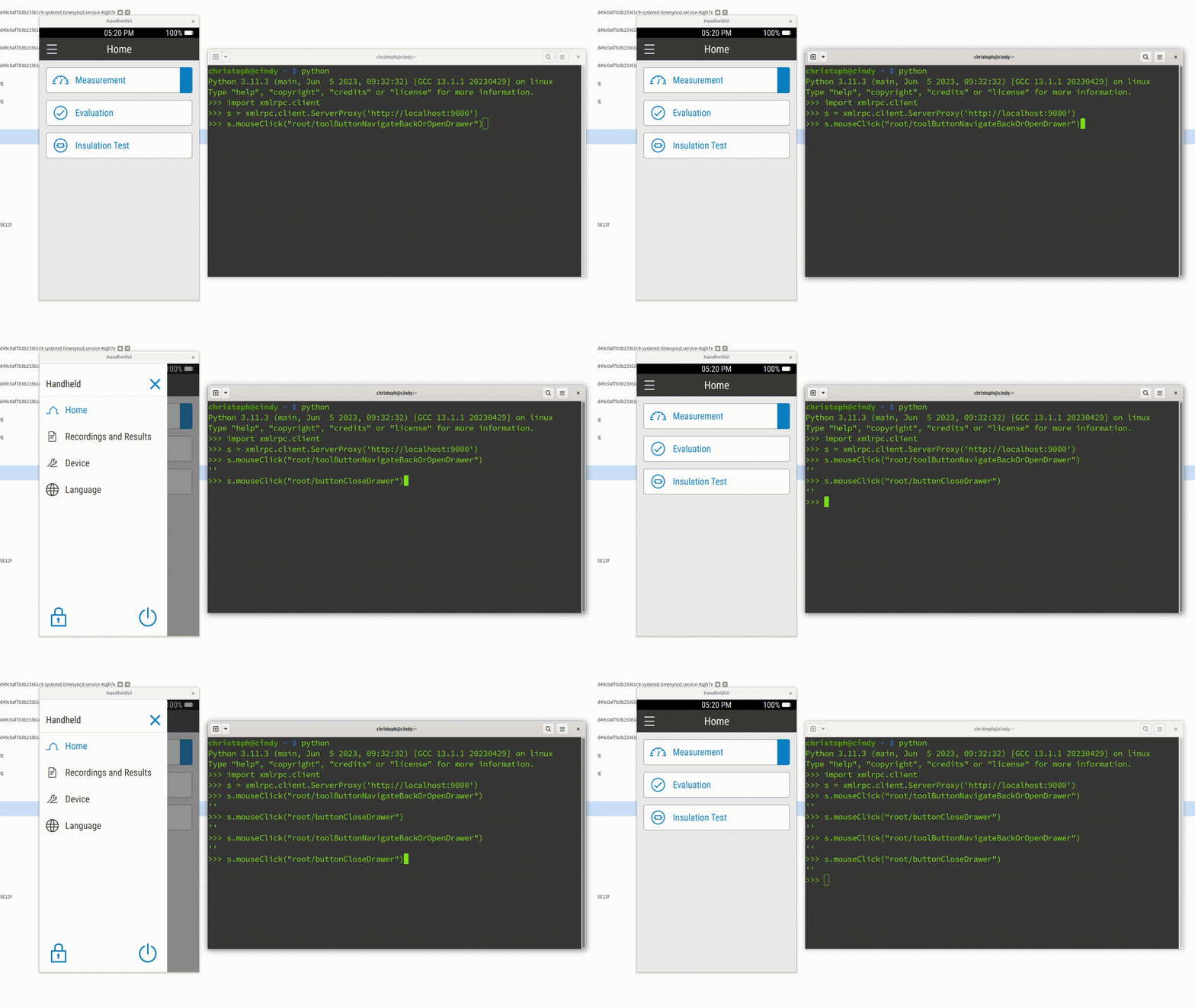
As Embedded Software Developers, we all know the pain: you make a code change, rebuild your project, restart the application - and then spend precious seconds repeating the same five clicks just to reach the screen you want to test. Add a login dialog on top of it, and suddenly those seconds turn into minutes. Multiply that by a hundred iterations per day, and it’s clear: this workflow is frustrating, error-prone, and a waste of valuable development time.
In this article, we’ll look at how to automate these repetitive steps using Spix, an open-source tool for GUI automation in Qt/QML applications. We’ll cover setup, usage scenarios, and how Spix can be integrated into your workflow to save hours of clicking, typing, and waiting.
Imagine this:
This is fine the first few times - but if you’re doing it 100+ times a day, it becomes a serious bottleneck. While features like hot reload can help in some cases, they aren’t always applicable - especially when structural changes are involved or when you must work with "real" production data.
So, what’s the alternative?
Spix allows you to control your Qt/QML applications programmatically. Using scripts (typically Python), you can automatically:
This means you can automate login steps, set up UI states consistently, and even extend your CI pipeline with visual testing. Unlike manual hot reload tweaks or hardcoding start screens, Spix provides an external, scriptable solution without altering your application logic.
Getting Spix integrated requires a few straightforward steps:
git submodule add 3rdparty/spix git@github.com:faaxm/spix.gitCMakeLists.txt with a find_package(Spix REQUIRED) call.LIST(APPEND CMAKE_MODULE_PATH /home/christoph/KDAB/spix/cmake/modules)
find_package(Spix REQUIRED)Spix to your target_link_libraries call.target_link_libraries(myApp
PRIVATE Qt6::Core
Qt6::Quick
Qt6::SerialPort
Spix::Spix
)main.cpp.Spix::QtQmlBot.9000).#include <Spix/AnyRpcServer.h>
#include <Spix/QtQmlBot.h>
[...]
//Start the actual Runner/Server
spix::AnyRpcServer server;
auto bot = new spix::QtQmlBot();
bot->runTestServer(server);At this point, your application is "Spix-enabled". You can verify this by checking for the open port (e.g. localhost:9000).
Spix can be a Security Risk: Make sure to not expose Spix in any production environment, maybe only enable it for your Debug-builds.
Once the setup is done, Spix can be used to automate repetitive tasks. Let’s look at two particularly useful examples:
Instead of typing your credentials and clicking "Login" manually, you can write a simple Python script that:
localhost:9000userField and passwordFieldimport xmlrpc.client
session = xmlrpc.client.ServerProxy('http://localhost:9000')
session.inputText('mainWindow/userField', 'christoph')
session.inputText('mainWindow/passwordField', 'secret')
session.mouseClick('mainWindow/"Login"')When executed, this script takes care of the entire login flow - no typing, no clicking, no wasted time. Better yet, you can check the script into your repository, so your whole team can reuse it.
For Development, Integration in Qt-Creator can be achieved with a Custom startup executable, that also starts this python script.
In a CI environment, this approach is particularly powerful, since you can ensure every test run starts from a clean state without relying on manual navigation.
Beyond input automation, Spix also supports taking screenshots. Combined with Python libraries like OpenCV or scikit-image, this opens up interesting possibilities for testing.
Take a screenshot of the main window and store it first:
import xmlrpc.client

session = xmlrpc.client.ServerProxy('http://localhost:9000')

[...]
session.takeScreenshot('mainWindow', '/tmp/screenshot.png')k
Now we can compare it with a reference image:
from skimage import io
from skimage.metrics import structural_similarity as ssim

screenshot1 = io.imread('/tmp/reference.png', as_gray=True)
screenshot2 = io.imread('/tmp/screenshot.png', as_gray=True)

ssim_index = ssim(screenshot1, screenshot2, data_range=screenshot1.max() - screenshot1.min())

threshold = 0.95

if ssim_index == 1.0:
    print("The screenshots are a perfect match")
elif ssim_index >= threshold:
    print("The screenshots are similar, similarity: " + str(ssim_index * 100) + "%")
else:
    print("The screenshots are not similar at all, similarity: " + str(ssim_index * 100) + "%")
This is useful for catching unexpected regressions in visual layout.
Use OpenCV to highlight pixel-level differences between two screenshots—for instance, missing or misaligned elements:
import cv2

image1 = cv2.imread('/tmp/reference.png')
image2 = cv2.imread('/tmp/screenshot.png')

diff = cv2.absdiff(image1, image2)

# Convert the difference image to grayscale
gray = cv2.cvtColor(diff, cv2.COLOR_BGR2GRAY)

# Threshold the grayscale image to get a binary image
_, thresh = cv2.threshold(gray, 30, 255, cv2.THRESH_BINARY)

contours, _ = cv2.findContours(thresh, cv2.RETR_EXTERNAL, cv2.CHAIN_APPROX_SIMPLE)
cv2.drawContours(image1, contours, -1, (0, 0, 255), 2)

cv2.imshow('Difference Image', image1)
cv2.waitKey(0)
This form of visual regression testing can be integrated into your CI system. If the UI changes unintentionally, Spix can detect it and trigger an alert.
Defective Image
The script marked the defective parts of the image compared to the should-be image.
Spix is not a full-blown GUI testing framework like Squish, but it fills a useful niche for embedded developers who want to:
While there are limitations (e.g. manual wait times, lack of deep synchronization with UI states), Spix provides a powerful and flexible way to automate everyday development tasks - without having to alter your application logic.
If you’re tired of clicking the same buttons all day, give Spix a try. It might just save you hours of time and frustration in your embedded development workflow.
About KDAB
The KDAB Group is a globally recognized provider for software consulting, development and training, specializing in embedded devices and complex cross-platform desktop applications. In addition to being leading experts in Qt, C++ and 3D technologies for over two decades, KDAB provides deep expertise across the stack, including Linux, Rust and modern UI frameworks. With 100+ employees from 20 countries and offices in Sweden, Germany, USA, France and UK, we serve clients around the world.
3 Comments
20 - Feb - 2026
Steve
Looks interesting. Could spix be side-loaded / wrapped-around in a similar vein to GammaRay?
23 - Feb - 2026
ChristophSt
Hi Steve, Chris, the author here. With some effort, yes.
Here is what it would take, roughly: 1. Spix would need to be compiled with the exact same Qt like the AUT (Applicaiton under Test)
2. Spix would need to LD_PRELOAD / ptrace-attach into the AUT. 3. Once Spix gets hold of the mainWindow and the qmlEngine, it just works as before.
I see it more like a developer tool, so inserting it in code is just easier for that usecase. If its for automating 3rdparty apps, your case would be stronger and with the above points its technically feasible.
24 - Feb - 2026
Steve
Thanks for the feedback. I appreciate that the use of python scripting and the awareness of implementation details (e.g. widget names) result in the tool being developer-focused. For cases where a developer is using spix to automate a test scenario it would be convenient if the tests could also be run against the release build to increase confidence in the produced binary. I'd argue this is useful even if you have access to higher-level tools, such as Squish... and invaluable if you don't (Squish is expensive enough that a price is not published).